Prijedlozi #14704
Zatvoren

sip <=> skype gateway
0%
Opis
već sam ranije gledao, i znam da postoji par rješenja SIP <-> skype,
SIP to Skype gateway breaks Skype's Great Wall of VoIP:"http://blog.tmcnet.com/blog/tom-keating/skype/sip-to-skype-gateway-breaks-skypes-great-wall-of-voip.asp"
Dal over at Asterisk VoIP News forwarded me an interesting link last week on a project he's been working on that creates a gateway between Skype and Asterisk or any SIP-based client. As most techies know, Skype uses a proprietary protocol and does not support inbound SIP calls. If you ask Skype CEO, Niklas Zennstrom why Skype chose their own proprietary protocol, (which many reporters have asked him), he always gives the same canned reply - that they chose their own proprietary protocol because SIP doesn't do everything they need, SIP has issues traversing firewalls, our proprietary protocol is more flexible, blah blah blah. Even though there are now NAT traversal solutions for SIP that perhaps didn't exist a couple of years ago, Skype still hasn't moved to SIP and it doesn't look like they will. Certainly now Skype has little to no incentive to move to SIP since they are "top dog" in VoIP and would probably rather have their own "VoIP walled garden" to keep competitors out and also force their customer base to use their revenue-generating SkypeOut service. Well, according to Asterisk VoIP News, Skype's Great Wall of VoIP has been cracked!
Dal writes in his Asterisk VoIP News blog entry:
I've wanted to be able to gateway calls between Skype and Asterisk for a while, which of course would require some type of protocol converter (IAX or SIP to Skype, probably.) This of course is directly not in Skype's interest, since they would like to keep the network closed (boo!) so that users are forced to use their PSTN gateway and other revenue-generating systems. On the other hand, I'm trying to crack this open so that any VoIP channel can talk to any other VoIP channel. Asterisk provides the ideal platform for this type of conversion, if only Skype were accessible...
Asterisk VoIP News then goes on to explain that there is a softwarel program called "PSGW" (http://www.rsdevs.com/) which runs on Windows and does SIP to Skype conversion. (Dal also opines that there should be a Linux port of PSGW.) According to Asterisk VoIP News, "It uses the Skype API to create calls in both directions, and then uses somewhat of a kludge using software audio "cables" between a SIP/RTP driver system and the Skype API." Essentially, you can use an Asterisk box for your call routing and PBX functionality and use the Skype network for termination.
John Todd, a networking and VoIP consultant, specializing in Asterisk implementations, who claims to never sleep, told me that the system can work "standalone" without Asterisk of course, but Asterisk makes it much more useful since Asterisk has powerful dialplan capabilities that enable you to do Skype mappings inside your dialplan without having to remember complex dial strings. John also said, "Plus, limiting the SIP calls from a single IP address (your Asterisk server) is a heck of a lot more secure than leaving it 'wide open' which is the only other alternative right now."
Here's how it works:
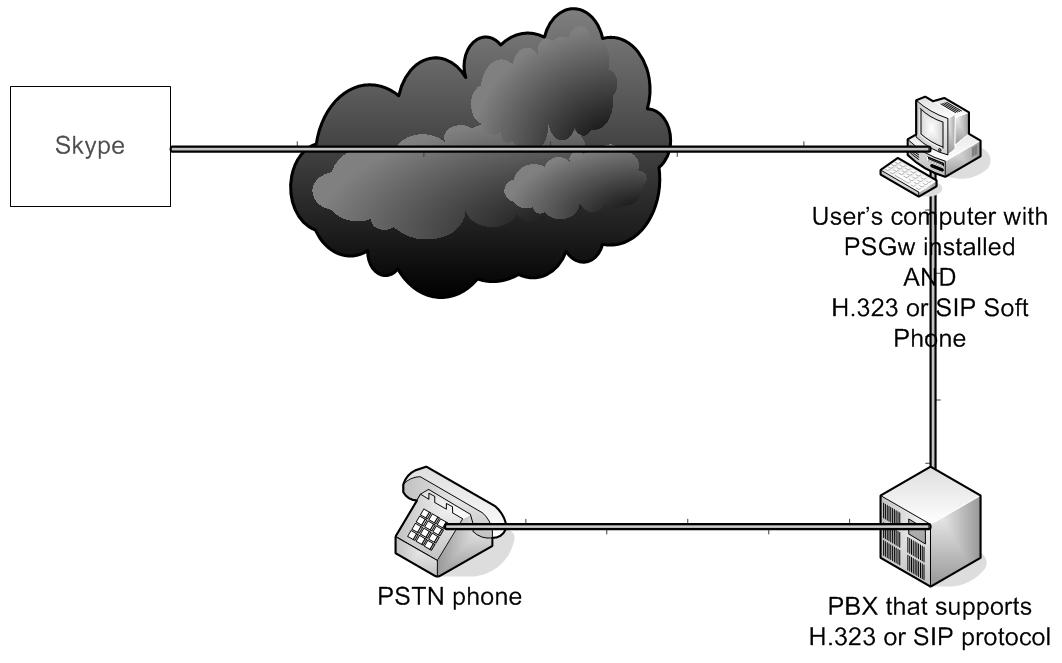
1) User makes a SIP URI call (using SIP phone or softphone) to a domain where the PSGW software is located. For this example, suppose I have it running on my domain: tmcnet.com. Thus, you can simply SIP dial <username>@tmcnet.com
2) The call is routed to the tmcnet.com firewall or SIP proxy with port 5060 mapped to a PC running Skype and the PSGW software.
3) The PSGW takes the SIP call, strips off “<username>” from <username>@tmcnet.com and then initiates a Skype call to Skype user “<username>”. (Thus, you simple need to pre-pend the Skype username you wish to call to the domain.)
4) The PSGW then “bridges” the audio from the Skype leg of the call with the SIP leg of the call.
That's it! You've just made a SIP-to-Skype call. Skype's Great Wall of VoIP has just been breached! Granted, it is a bit of a "kludge" requiring a host PC running Skype & PSGW, but cool stuff nevertheless, eh?cool
There are many interesting possibilities and uses for this. Maybe I'll see if I can get a demo copy of PSGW and try it myself. If anyone else tries the $29 PSGW software, let me know what you think and what interesting applications you use it for.
Fajlovi
 Izmjenjeno od Ernad Husremović prije skoro 18 godina
drugo rješenje skip2pbx
http://store.skip2pbx.com/index.php/skip2pbx-v21/skip2pbx-v21-basic-edition.html
Skip2PBX version 2.1 Basic Edition features:
- Support up to 10 concurrent lines on a single PC.
- SIP Support (G711)
- Analog, ISDN BRI and PRI PCI Card Support (Digium and Eicon)
- FXO/FXS Support even in mixed mode
- Customizable audio notification
- Call Inward support through DISA or with FXO cards
- Direct association between Caller and Recipient for automatic call inward
- CallerID support
- Multiuser access level
- Automatic configuration of Skype user profile
- Calls log transfer through FTP or Email
- Automatic insert of caller profile in the address book
- Automatically find the first free line on incoming calls
- Complete Address book with Company and Contacts info
- Each single acount can be anabled or disabled on user request
- Policy on incoming calls
- Policy on outgoing calls, even based on user login
- Automatic Backups
- Require a dedicated Hardware
- Based on Linux Ubuntu Operating system
- Simple and Fast installation (no more than 10 minutes to install)
- Automatic installation Process (no knowledge of linux is necessary)
košta 580 EUR
Izmjenjeno od Ernad Husremović prije skoro 18 godina
http://www.asteriskvoipnews.com/asterisk_development/skypetoasterisksip_progress_part_1.html
I've wanted to be able to gateway calls between Skype and Asterisk for a while, which of course would require some type of protocol converter (IAX or SIP to Skype, probably.) This of course is directly not in Skype's interest, since they would like to keep the network closed (boo!) so that users are forced to use their PSTN gateway and other revenue-generating systems. On the other hand, I'm trying to crack this open so that any VoIP channel can talk to any other VoIP channel. Asterisk provides the ideal platform for this type of conversion, if only Skype were accessible...
Please hold flames about how Skype is the enemy of open telephony standards. I don't disagree. However, for a small sub-set of users that I work with, Skype is a channel that is preferred for audio in some circumstances, and I feel that it's worthwhile to have some ability to connect with users who have expressed that preference.
There exists a commercial program called "PSGW" (http://www.rsdevs.com/) which runs on (booo!) Windows and does SIP to Skype conversion. It's about $29 USD. It uses the Skype API to create calls in both directions, and then uses somewhat of a kludge using software audio "cables" between a SIP/RTP driver system and the Skype API. It works reasonably well, but to date has been somewhat limited because it will only terminate calls to a specific Skype user on the far end which is mapped in the program itself. This has been somewhat limiting, since that means I can't arbitrarily specify a user in the SIP invite to whom I want to communicate.
I have contacted the company (programmer) that sells this software, and I've negotiated a payment to him to patch the code such that PSGW will allow arbitrary specification of Skype-side user choice, as I've asked that this be released as part of the general distribution of this commercial software. He says that this should be ready within the next week or two for testing by me, and then I've asked that the
code is released into the next versions of PSGW. So basically, I'm putting out a press release about someone else's commercial software, but I think it's worth noting because of the usefulness of this when used in conjunction with Asterisk.
I'll keep the list updated with the progress of the code and tests with Asterisk.
Izmjenjeno od Ernad Husremović prije skoro 18 godina
http://www.asteriskvoipnews.com/asterisk_development/skypetoasterisksip_progress_part_2.html
So, we have liftoff.
I have received the updated code from the programmer, and it does work as requested. I can now make calls (via SIP) to a Windows system running Skype and the revised PSGW software, and that system then turns the calls around and uses the SIP destination as the Skype username, and the call is terminated on the Skype network to the appropriate user. I've tested to various users and the echo123 test, and it sounds great! So I have the first SIP-to-Skype end-user specifiable gateway running. To avoid being Slashdotted, I won't post my test SIP destinations publicly, and of course the system can only handle one Skype conversation at a time.
Plans for the system: it will become (among other things) a find-me, follow-me type extension in our Asterisk diaplan - not only will the system ring your desk phone and cell phone, but it'll also try your Skype account.
Downsides: there is no caller ID, at least not as part of the signalling. All the calls to the Skype destinations get whatever account information is associated with the Skype account that is running on the Windows system. Of course, other methods could be used here, such as text-to-speech pre-call completions, DTMF (?? not sure how that works with Skype), or semi-out-of-band instant messaging exchanges. None of these methods are implemented yet, but it appears that they are being developed.
I've asked the programmer if he plans to release the revised code as his next update to PSGW.
Izmjenjeno od Ernad Husremović prije skoro 18 godina
http://www.oreillynet.com/etel/blog/2006/10/hooking_up_skype_to_asterisk_n.html
So far, the success of Skype within their walled garden of VoIP has been quite impressive. One of the more interesting things I’ve learned from my travels is that Skype is extremely popular in Asia (at least outside of Japan) so much that in many places, “Skype” is synonymous with “VoIP.” However, there is benefit in using a standards-based approach, especially if that helps us to integrate Skype’s network in with the rest of the telephone network. This has long been a point of interest; Stuart Henshall wrote about Skype/SIP interactions more than a year and a half ago.
I’ve spent a good bit of my free time in the last month investigating three small-scale Skype to SIP integration packages. You can read the details at the link. Of the three that I looked at, ChanSkype was the most promising. It had a complex setup, but by far the best sound quality and it was also the easiest to integrate into the dialplan. A new version was released last week, but I haven’t been able to try it yet. Stay tuned…
Izmjenjeno od Ernad Husremović prije skoro 18 godina
Initial investigations on hooking up Skype to SIP with Asterisk: NCH Uplink, ChanSkype, and PSGw
I’ve been playing around for the past couple of weeks with Skype-to-SIP adapters so that I could set up a Skype trunk with my home Asterisk server. No matter what your feelings on the proprietary Skype approach, it does deal with NAT quite well, and that may be important if you are on a single dynamic IP address connection. I’ve also been interested in integrating Skype into the Asterisk setup since the announcement of free outbound calling through the end of 2006. Although there are $1,000 Skype-to-PBX bridges, I am not interested enough in Skype connections to spend more money than my Asterisk server hardware cost. For my investigation, I looked at three “personal-scale” products:
- NCH Swiftsound’s Uplink Skype-to-SIP adapter
- ChanSkype
- RS Development Group’s Personal Skype Gateway (PSGw)
All three products take the same approach. Each product is composed of a SIP interface component and a Skype client control component that uses the Skype API. When a call comes in to one half, it is directed to the other half, typically by redirecting the audio streams from the speakers through an operating system conduit. PSGw uses the term software audio cable, which is the best description.
Uplink Skype to SIP
NCH Swift Sound is an Australian company with expertise in computer-based audio and a few VoIP-related applications. Uplink’s installer offers you the Axon PBX, though it’s not necessary when you plan on using Asterisk. Uplink is a Windows application, and has a $40 price tag for license, though free downloads are available.
I already run one full-time PC for Asterisk, and I didn’t want another one just in case somebody decided to Skype me. My first approach was to try running Uplink in VMware, though I quickly abandoned that when it became clear just how much the VMware emulation layer would require in terms of resources. When the Windows VM needed CPU time, it dramatically affected performance of the applications running under Linux. The sound quality was awful, too. At first, I wondered if the sound quality was due to resource constraints on the shared system, so I ran Uplink on a separate machine. Although sound quality improved, the audio was still not anywhere near conversational quality. It was interrupted by frequent drops and hesitations. The only reason that I could make out what was coming through the telephone is that I had recorded the voice prompts myself.
To correctly get Skype to call out to a phone number, there’s a bit of phone number massaging required. Skype expects a call out number to be done in the international telephone style (1415…), so you’ll need to add the plus sign on. To dial a skype user from the telephone keypad, you’ll also need to set up a mapping between a number and the name. Here’s some example dialplan code that does both. (Uplink is set up to register with the peer name “skype”.)
//Use "09" as a Skype outbound trunk
//Add leading "" on to 1-NPA-NXX-XXXX number
_091NXXXXXXXXX => {
Answer;
Dial(SIP/+${EXTEN:3}@skype,60,);
};
// Map 09-888 to echo service
_09888 => {
Answer;
Dial(SIP/echo123@skype,60,);
};
Plus:
1. The easiest setup of the three applications I tested. Uplink installs like any other Windows application, and its configuration is well thought out. It also shows reasonable debugging information as it runs, so it’s pretty easy to see what’s going on inside.Minuses:
1. Windows-only solutions require a second box with Linux-based Asterisk systems. (This may be offset if you have a powerful enough machine to run VMware, but my VMware installation bogged down on a 1.6 GHz AMD Turion64 with 512 MB RAM.)
   2. Poor sound quality, regardless of whether Uplink runs in a VM or on an external machine.
   3. Poor call supervision. Frequently, Skype would stay connected even though Asterisk had sent a BYE message to the SIP side of Uplink. I had to fix this by hanging up in the Skype GUI.
ChanSkype
Note: The following applies to an old version of ChanSkype. Last Wednesday, they released version 1.2, which could address one of my major concerns.
ChanSkype was announced in early October by a Brazilian company. The approach is perhaps the best of any of these products because it makes Skype instances appear as channels, rather than trying to control clients directly with a co-resident SIP gateway. It has the ability to use multiple Skype instances as outbound trunks from the same machine, which is a unique capability within the products that I looked at.
Configuration of ChanSkype was the most in-depth of any of the products. None of it is particularly hard, and the company provides quite good documentation. My two big challenges were the general configuration complexity, as well as the fact that the channel driver is provided as a 32-bit binary driver and can’t be dynamic linked into a 64-bit Asterisk.
The configuration complexity comes directly from the approach that the product takes. Several instances of the Skype client are each run by using VNC as the display. With several VNC instances running, each Skype client can function as an outbound trunk that is directly addressable by the channel driver. Unfortunately, even if you only want one Skype instance, it still requires VNC.
To set up outbound calling, you’ll need to add the plus sign on to the front of the number, as in the following dialplan code:
//Use "09" as skype trunk
_091X. => {
Answer;
Dial(Skype/any/+${EXTEN:3},60,);
};
I had trouble with one-way audio during this test, though I believe that was due to NAT on my own network, and a SIP security device that I am using.
Pluses:
1. ChanSkype had by far the best audio. The inbound audio when making a telephone call was nearly perfect, though it was hard to tell from the 15-second per-call limit that is embedded into the channel driver.
   2. Unlike the other two products, this one is capable of sending multiple Skype streams outbound because it runs multiple clients simultaneously. This is hard to test with a 15-second call limit, though.
   3. The best integration into the dialplan. Because ChanSkype is a channel driver, it’s easy to say Dial(Skype/skypeinstance/number) and let the channel driver figure out who’s free.
Minuses:
1. This was the most complex configuration. Even if you only want one outbound Skype trunk, it requires running a VNC server for that client.
   2. If you run Asterisk on AMD64, there may be some extra work to get the 32-bit channel driver running. I run Asterisk on Gentoo, and found that recompiling Asterisk as a 32-bit application is sufficient because there is a wide range of compatibility libraries that can be used. (In talking with the company, I discovered they plan to release a 64-bit version.)
   3. ChanSkype doesn’t take inbound calls. If your purpose is to get cheaper outbound calling, this may not be a problem for you. (Note: ChanSkype 1.2, announced on October 25, lifts this limitation.)
Personal Skype Gateway (PSGw)
PSGw is one of the oldest Skype-to-SIP converters. Although it started on Windows, it was ported to Linux in July of this year. Because of my preference for a single-machine solution, I worked with the Linux version. Like ChanSkype, the Linux PSGw is distributed as a 32-bit application. On my system, however, there are repeated segmentation faults if it is run with 64-bit libraries.
PSGw requires a separate IP address from Asterisk to avoid port conflicts. I solved this with a secondary address on the main network interface, but this may not be possible if you don’t have enough routable IP addresses, or a way to keep the PSGw-to-Asterisk connection from going through a NAT. (At the Interop Labs earlier this year, we found that SIP and NAT don’t mix.)
Once I had successfully installed PSGw, it was easy to start. When I made my first call, PSGw mapped the call from SIP on to Skype and promptly died. As far as I can tell, the premature death was due to a library conflict. On Linux, the Skype API runs over D-Bus, and a key dynamic library used by PSGw is distributed as a 32-bit object. I was able to solve the problem by building a 32-bit chroot area, though that’s definitely not for the faint of heart. (To get Skype running in the 32-bit chroot, I needed to have a second, 32-bit version of the libraries it depends on, as well as the sound daemon used by KDE.)
Even once the 32-bit chroot was in place, there were problems with PSGw staying up if I permanently authorized PSGw to use the Skype API. To revoke the authorization, remove it from the config.xml file for the user you sign on as. Look for this line, and take out any programs that are authorized:
Pluses:
1. By far the best call supervision. When Asterisk hung up, PSGw would terminate the Skype call. There was never a call leg that stayed up longer than its counterpart.Minuses:
1. Most complex setup on AMD64 due to the apparent requirement for a 32-bit chroot. (This isn’t documented anywhere, but the program crashed a lot until I put it into a 32-bit chroot.)
   2. Extremely poor call quality. I couldn’t tell that it was relaying human speech.
Closing thoughts
Based on my testing, ChanSkype seems like the most promising approach. I’ll try the recently-released 1.2 version, and report back.
In the future, it may be possible to use something likethe recently-announced Philips VOIP841, which would seem to offer the ability to be a Skype-to-analog converter that doesn’t require a computer. (Philips also announced Netgear would deliver a PC-less Skype phone.)
Izmjenjeno od Ernad Husremović prije skoro 18 godina
chan.skype cijene
Corporate Licenses: US$ 99 per license for up to 30 licenses- You will need one corporate license per active channel. So, if you want to be able to simultaneously make/receive 10 Skype calls, you will need 10 licenses.
- Owners of any quantity of Corporate Licenses are entitled to free technical support. Typical configuration for 30 ChanSkype channels: Dual Xeon 3GHz, 6 Gb memory.
- Each ChanSkype installation accepts ONLY ONE Personal License. Installing more than one Personal License per machine is a waste of money, as only the first one will be considered by the driver. Owners of Personal Licenses are not entitled to free technical support.
Izmjenjeno od Ernad Husremović prije skoro 18 godina
chanskype requirements
In order to get ChanSkype up and running, you will need the following:- The i386 version of one of these Linux distributions (64 bit versions are not yet supported): Fedora Core 3, Fedora Core 4, Fedora Core 5 or Ubuntu 6.04 Dapper Drake.
- Asterisk v1.2.9 or greater.
- An X server.
- A VNC server.
- The official Linux Skype client v1.3 (v1.2.X will not work).
- The gcc C compiler and associated libraries.
- The Qt development library.
- The kernel development files.
- A fair knowledge of Asterisk and Linux system administration.
Izmjenjeno od Ernad Husremović prije skoro 18 godina
skystone
In a nutshell
STONEVOICE has developed SKYSTONE, a software based SKYPE gateway that interconnects any IP Telephony solution or traditional PBX to the “skype world”. It's a true converging solution, using standard protocols, such as SIP and H.323, to interoperate with PBX's and a skype connection to the skype community. First among all IP PBX solutions, the Cisco Unified Communication solution (with Callmanager and Callmanager Express) is supported by Skystone. The main goal of Skystone is to make sure that all users in the company will be able to call any pstn phone or skype account directly from an ip phone.
Introduction
The market is facing a sharp technology transition from traditional Time Division Multiplexing (TDM) based telephony systems to IP Telephony that is taking place at full steam all over the places. This brings to the companies many advantages among which convergence, simplicity, cost reduction and computer telephony integration that ultimately leads to undoubted increase in productivity, better, quicker, easier communication and information sharing. Companies have the unique opportunity to turn all the above into a significant competitive advantage in a market, which is every day more global.
One evidence of this shift towards IP is the fact that the Voice is carried very often over IP even when a traditional call is made. Carriers are offering more and more a data connection only to their customers and the enterprises use it for both data and voice access.
On the other side new cool services and solutions based on VoIP are gaining unbelievable consensus among the consumers as well as the Commercial market. For example Skype has rapidly established a strong leadership world wide in the consumer VoIP market and it currently features millions of users including employees of companies who benefits from it. This is raising a new need for their companies that need to integrate and merge the new Skype reality with the existing telecommunication infrastructure to take full benefit of it.
The final objective is to make sure that employees take full advantage of all Skype services without having to handle a double handset infrastructure or double telephone numbers and, most of all, avoid security issues.
Izmjenjeno od Ernad Husremović prije skoro 18 godina
SippySkype java
What is SippySkype?
SippySkype is Java software that allows you to make and receive Skype calls from your SIP/VOIP adapter. Basically a Skype/SIP Bridge/Gateway/Proxy/Adapter/Converter. It has a codec converter to convert SIP PCMU RTP audio to compatible Skype PCM audio and Skype PCM audio to SIP PCMU RTP audio. It performs SIP signaling and Skype call handling with your SIP adapter, Asterisk Server or SIP VOIP provider.
SippySkype Sip to Skype Gateway Features:- Call Skype Users using speed dial or use SkypeOut
- Skype Callers can be directed to the SIP address of your choice
- SIP to Skype authentication/denial mappings via SIP caller ID and IP blocks
- Skype to SIP authentication/denial mappings via incoming Skype User ID
- Supports DTMF touchtone decoding/encoding via RFC2833 or INFO
- Connect Asterisk or other SIP PBX to Skype Users
- Auto play pre-recorded file(s) to SIP and Skype callers
- Incoming SIP Pin number authentication and dialing
- Open Source - You can modify/fix it if you like
- It's free - Don't pay anything to anyone to use this software
- Skype Client
- Working Java 1.5 or better runtime
- mjsip/mjua 1.6 http://www.mjsip.org/ - You must use those included with SippySkype as some changes/bug fixes have been made
- Skype4Java tarball as of 2008/03/14 https://developer.skype.com/wiki/Java_API - Unmodified
- log4j-1.2.15 http://logging.apache.org/log4j/1.2/download.html - Unmodified
- SIP/VOIP adapter such as a spa-3102 to make and receive Skype calls, register with a provider or setup Asterisk/SIP PBX
- Should work where Skype4Java works (windows/linux/osx). (I'm using it on Windows XP)
- See the readme.txt file to setup
- Supports only PCMU/G.711 codec
- Supports only one simultaneous call per instance
SippySkype is Licensed under GNU
MJSip is licensed under GNU
Skype4Java is Licensed under Apache Software License v2.0
log4j is Licensed under Apache Software License v2.0
Izmjenjeno od Ernad Husremović prije skoro 18 godina
- Naslov promijenjeno iz sip <=> skype proxy u sip <=> skype gateway
Izmjenjeno od Ernad Husremović prije skoro 18 godina
Izmjenjeno od Ernad Husremović prije skoro 18 godina
Izmjenjeno od Ernad Husremović prije više od 17 godina
- Status promijenjeno iz Dodijeljeno u Zatvoreno