Podrška #15186
Zatvoren

zimbra jetty server
0%
Opis
kako šta ...
Fajlovi
Povezani tiketi 3 (0 otvoreno — 3 zatvorenih)
 Izmjenjeno od Ernad Husremović prije više od 17 godina
http://www.mojavelinux.com/blog/archives/2007/03/remote_debugging_with_jetty/
-Xdebug -Xnoagent -Djava.compiler=NONE -Xrunjdwp:transport=dt_socket,address=4000,server=y,suspend=n
Izmjenjeno od Ernad Husremović prije više od 17 godina
Configuring the server for remote debugging
Thos is a feature of the server. This information is provided for your convenience. For definitive documentation, consult your server documentation.
Go to the Jetty home directory and create a folder named work. By default Jetty compiles JSP pages into the system temporary folder. If a work directory exists, servlets will be compiled in this directory instead, making it easier for debugging.
Start the Jetty server with following commands:
CD c:\jetty-5.1.10
java -Djetty.home=c:\jetty-5.1.10 -Xdebug -Xrunjdwp:transport=dt_socket,address=8453,suspend=n,server=y -jar start.jar
Izmjenjeno od Ernad Husremović prije više od 17 godina
Izmjenjeno od Ernad Husremović prije više od 17 godina
Izmjenjeno od Ernad Husremović prije više od 17 godina
All you need to do is to unzip the distribution. The top level directory should look like:
contexts etc examples extras lib LICENSES modules patches pom.xml project-website README.txt start.jar VERSION.txt webapps webapps-plusThe files and directories are:
- contexts hot deploy directory
- etc is the directory for jetty configuration files
- examples contains sample webapps demonstrating various features and code examples of embedding Jetty
- extras contains optional extensions to jetty
- lib contains all the jar files necessary to run jetty6
- LICENSES contains the license agreements for the project
- modules contains all of the source submodules
- patches contains contributed source patches
- pom.xml is the maven2 build file for jetty6 (see also Building from Source)
- project-website contains the jetty6 website
- README.txt contains useful getting started information
- start.jar is the jar that invokes jetty6 (see also Running Jetty-6.1.x)
- VERSION.txt is an abbreviated change log for each release
- webapps a directory containing some demo webapps
- webapps-plus a directory containing some webapps demonstrating the extended features of jetty6 (see also JNDI)
Izmjenjeno od Ernad Husremović prije više od 17 godina
http://docs.codehaus.org/display/JETTY/Syntax+Reference
Syntax
IOC = inversion of control
DI = dependency injection
Jetty.xml IOC/DI has long been available even before spring sprung (springframework) Almost anything you can do programmatically can be done on jetty.xml, so long as it does not require loops.
The entire functionality is covered by two classes:
1. org.mortbay.xml.XmlConfiguration
2. org.mortbay.xml.XmlParser
...
Izmjenjeno od Ernad Husremović prije više od 17 godina
What is jetty.xml?
The jetty.xml file is a default configuration file for Jetty and is located at $JETTY_HOME/etc/jetty.xml. You can call the file anything and it can be located anywhere in the filesystem. It is supplied to jetty on the runline like so:
java -jar start.jar etc/jetty.xml
You can also have more than one configuration file:
java -jar start.jar etc/abcd.xml etc/xyz.xml
If the id of the server is the same in each configuration file, then the same server is configured by each file and the configurations are added together. If the id of the server is different, then each config file will create a new Server instance within the same JVM.
The configuration files may be parametrized with either System properties (using SystemProperty tag) or properties files (using Property tag) passed on the command line. eg
java -Djetty.port=8888 -jar start.jar myjetty.properties etc/jetty.xml etc/other.xml
The jetty configuration format is a simple mapping from XML to java. With this format you can call the methods defined in the javadoc to configure a server. There is a more in-depth look this syntax and the jetty.xml file in the Syntax Reference section.
If you need to perform more specific setup on a webapp, you can use the jetty-web.xml file.
Izmjenjeno od Ernad Husremović prije više od 17 godina
What is jetty-web.xml?
The jetty-web.xml file is a jetty configuration file that can be bundled with a specific web application. When jetty deploys a webapplication, it looks for a file called WEB-INF/jetty-web.xml or WEB-INF/web-jetty.xml within the web application (or WAR) and applies the configuration found there after all other configuration has been applied to the web application.
The format of the jetty-web.xml file is the same as jetty.xml. That is, it is an xml mapping of the jetty API. Note that the object to which it is applied is an org.mortbay.jetty.webapp.WebAppContext instance rather than an org.mortbay.jetty.Server instance:
<?xml version="1.0"  encoding="ISO-8859-1"?>
<!DOCTYPE Configure PUBLIC "-//Mort Bay Consulting//DTD Configure//EN" "http://jetty.mortbay.org/configure.dtd">
<Configure class="org.mortbay.jetty.webapp.WebAppContext">
  ...
</Configure>
There is an example of this file in the distribution at $JETTY_HOME/webapps/test/WEB-INF/jetty-web.xml.
Izmjenjeno od Ernad Husremović prije više od 17 godina
What is Jetty's classloading architecture?
Class loading in a web container is slightly more complex than a normal java application.
The normal configuration is for each web context (web application or war file) is given it's own classloader, which has the system classloader as it's parent. Such a classloader hierarchy is normal in Java, however the servlet specification complicates the hierarchy by requiring that:- Classes contained within WEB-INF/lib or WEB-INF/classes have priority over classes on the parent class loader. This is the opposite of the normal behaviour of a java 2 class loader.
- System classes such as java.lang.String may not be replaced by classes in WEB-INF/lib or WEB-INF/classes. Unfortunately the specification does not clearly state what classes are "System" classes and it is unclear if all javax classes should be treated as System classes.
- Server implementation classes should be hidden from the web application and should not be available in any class loader. Unfortunately the specification does not state what is a Server class and it is unclear if common libraries like the xerces parser should be treated as Implementation classes.
How to configure classloading
Jetty provides configuration options to control all three of these options. The method org.mortbay.jetty.webapp.WebAppContext.setParentLoaderPriority(boolean) allows the normal java 2 behaviour to be used and all classes will be loaded from the system classpath if possible. This is very useful if the libraries that a web application uses are having problems loading classes that are both in a web application and on the system classpath.
The methods org.mortbay.jetty.webapp.WebAppContext.setSystemClasses(String[]) and org.mortbay.jetty.webapp.WebAppContext.setServerClasses(String[]) may be called to allow fine control over what classes can be seen or overridden by a web application.- SystemClasses cannot be overridden by webapp context classloaders.
- The defaults are; {"java.","javax.servlet.","javax.xml.","org.mortbay.","org.xml.","org.w3c.", "org.apache.commons.logging.", "org.apache.log4j."}
- ServerClasses (on the container classpath) cannot be seen by webapp context classloaders but can be overridden by the webapp.
- The defaults are: { "-org.mortbay.jetty.plus.jaas.", "org.mortbay.jetty.", "org.slf4j."};
Absolute classname can be passed, names ending with . are treated as packages names and names starting with - are treated as negative matches and must be listed before any enclosing packages.
Adding extra classpaths to Jetty
At startup, the jetty runtime will automatically load all jars from the top level $jetty.home/lib, along with certain subdirectories such as $jetty.home/lib/management/, $jetty.home/lib/naming/ etc, which are named explicity in the start.config file contained in the start.jar.
In addition, it will recursively load all jars from $jetty.home/lib/ext. So, to add extra jars to jetty, you can simply create a file hierarchy as deep as you wish within $jetty.home/lib/ext to contain these jars. Of course, you can always change this default behaviour by creating your own start.config file and using that instead. Otherwise, you can use one of the methods below.
Using jetty.class.path System property
If you want to add a couple of class directories or jars to jetty, but you can't put them in $jetty.home/lib/ext/ for some reason, or you don't want to create a custom start.config file, you can simply use the System property -Djetty.class.path on the runline instead. Here's how it would look:
java -Djetty.class.path="../my/classes:../my/jars/special.jar:../my/jars/other.jar" -jar start.jar
Using the extraClasspath() method on WebAppContext
If you need to add some jars or classes that for some reason are not in $jetty.home/lib nor inside your webapp's WEB-INF/lib or WEB-INF/classes, you can add them directly to your webapp:
<Configure class="org.mortbay.jetty.webapp.WebAppContext">

  ...
  <Set name="extraClasspath">../my/classes:../my/jars/special.jar:../my/jars/other.jar</Set>
  ...
Using a custom WebAppClassLoader
Finally, if none of the other alternatives already described meet your needs, you can always provide a custom classloader for your webapp. It is recommended, but not required, that your custom loader subclasses org.mortbay.jetty.webapp.WebAppClassLoader. You configure the classloader for the webapp like so:
MyCleverClassLoader myCleverClassLoader = new MyCleverClassLoader();
...

WebAppContext webapp = new WebAppContext();
...
webapp.setClassLoader(myCleverClassLoader);
Izmjenjeno od Ernad Husremović prije više od 17 godina
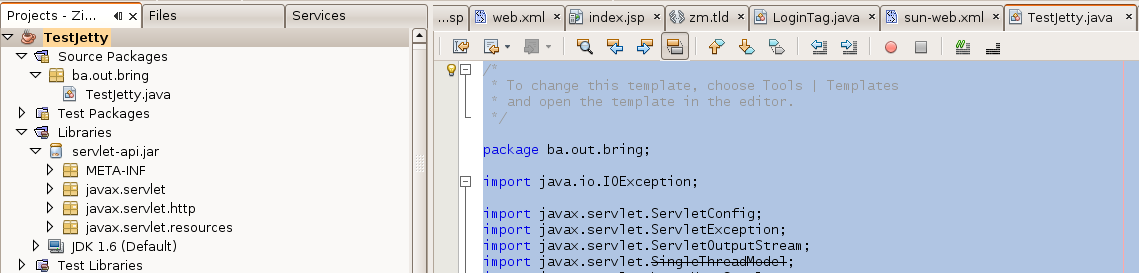
moj prvi servlet
TestJetty.java
package ba.out.bring;

import java.io.IOException;

import javax.servlet.ServletConfig;
import javax.servlet.ServletException;
import javax.servlet.ServletOutputStream;
import javax.servlet.SingleThreadModel;
import javax.servlet.http.HttpServlet;
import javax.servlet.http.HttpServletRequest;
import javax.servlet.http.HttpServletResponse;

/**
 *
 * @author hernad
 */
public class TestJetty  extends HttpServlet implements SingleThreadModel
{
    /* ------------------------------------------------------------ */
    public void init(ServletConfig config) throws ServletException
    {
        super.init(config);
    }

    /* ------------------------------------------------------------ */
    public void doPost(HttpServletRequest request, HttpServletResponse response) throws ServletException, IOException
    {
        doGet(request, response);
    }

    /* ------------------------------------------------------------ */
    public void doGet(HttpServletRequest request, HttpServletResponse response) throws ServletException, IOException
    {
        response.setContentType("text/html");
        ServletOutputStream out = response.getOutputStream();
        out.println("<html>");
        out.println("<h1>Hello World servlet ba.out.bring.TestJetty</h1>");
        out.println("</html>");
        out.flush();

        try
        {
            Thread.sleep(200);
        }
        catch (InterruptedException e)
        {
            getServletContext().log("exception",e);
        }
    }

}
hernad@nmraka-1:/opt/zimbra/jetty-6.1.11$ ls lib/TestJetty.jar
lib/TestJetty.jar
hernad@nmraka-1:/opt/zimbra/jetty-6.1.11$ cat webapps/test/WEB-INF/web.xml | grep -A 2 -B 2 ba.out.bring
  <servlet>
    <servlet-name>Hello</servlet-name>
    <servlet-class>ba.out.bring.TestJetty</servlet-class>
    <load-on-startup>1</load-on-startup>
  </servlet>
Izmjenjeno od Ernad Husremović prije više od 17 godina
- Fajl jetty_servlet.png jetty_servlet.png dodano
Izmjenjeno od Ernad Husremović prije skoro 16 godina
- Status promijenjeno iz Dodijeljeno u Zatvoreno